
Eloqua Cloud Apps – 06. Setting up our app and its services
In this chapter, we will set up our app and define its upcoming services in Eloqua.
First, check out the Register Your App help article on the Oracle dev portal.
The steps listed will guide you through app creation, which acts as a parent for all service types that you associate it (e.g. cloud action, cloud decision). Additionally, you will be able to specify URLs such as ‘Enable’ and ‘Status’ which are useful in terms of setup and maintenance. Note that the ones without an asterisk are not mandatory.
See below for an example and explanation;
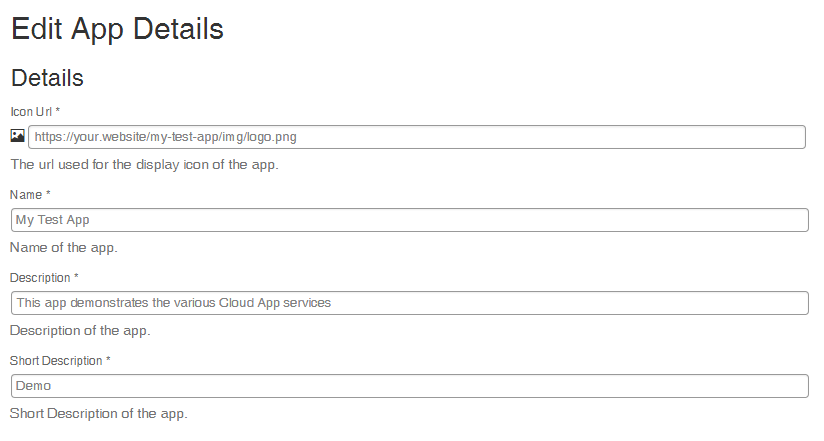
First, we specify the icon URL (note: must be HTTPS), the App Name and some descriptions.
Among other things, these items will be shown in AppCloud Developer overview screen.
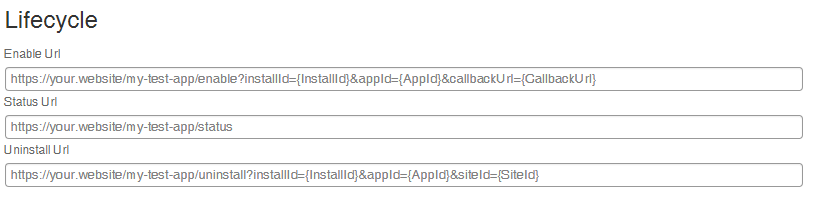
The lifecycle URLs have the following purpose:
- Enable URL: This URL will be called by Eloqua as soon as the entire app is enabled. For example, once your app is published to the Eloqua App Cloud and installed + enabled by a customer, you will receive a signal.
- Status URL: This URL should return a HTTP code indicating whether the app is active or under maintenance. For more info, check out the Status URL help.
- Uninstall URL: As with the Enable URL, this will be called once a user removes your app.
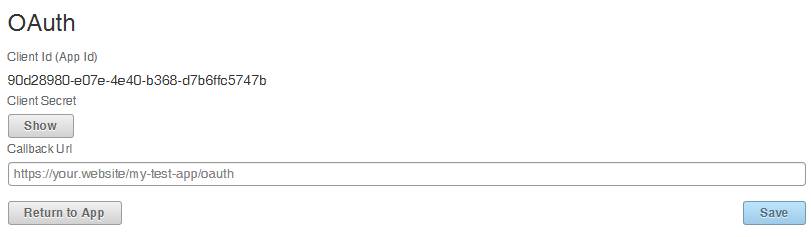
The OAuth callback URL is called whenever the user has authenticated your app through OAuth. He will then be redirected to this URL, with a Grant code in the query string.
For more info, check out the dedicated Authenticate Using OAuth 2.0 help page.
Click the Save button to create your app.
In our next chapter, we will add an Action Service and set up our first Cloud Action in PHP.


We are waiting for next tutorial “.Action Service and set up our first Cloud Action in PHP”. Please guide us in setting up the Action Service.
Hi Prakash,
Thanks for reading my Eloqua blog articles!
I’m working hard on the next chapters, and will try to release them in the next couple of weeks.
If you can’t wait, feel free to e-mail me with any specific questions: info at vxv dot nl.
Thanks for the instant reply. I am facing the below issue
We are trying to create a SMS APP in Eloqua. Follwing steps were done,
We have created a new App in Eloqua.
Action service is configure for the same.
New App is placed in Campaign canvas.
Created a segment ,and we have stubbed with few Contacts numbers.
Issues:
We are trying to get the Contact number/numbers configured from the segment & pass it to our SMS APP. But we cant able to find a solution for it.
Could you please guide us in fixing this issue?
Hi Prakash,
So you’ve created the campaign canvas, containing a segment and your cloud action (cloud connector).
Did you activate your campaign, so that the contacts flow through to the cloud action step?
If so, the Notification URL will be called by Eloqua (POST), containing contact data. Which contact data is sent, should be configured during the Create and/or Configure phase. For your case, at least the phone number would be needed as an extra field.
You can then process the incoming contacts (e.g. send SMS). After you’re done, you call the Bulk Import API, to set each contact status to ‘complete’ or ‘errored’. Setting to complete will move the contact to the next step in your flow.
The following resources are helpful;
Chronological flow description for Cloud Actions: http://docs.oracle.com/cloud/latest/marketingcs_gs/OMCAB/Resources/Images/AppCloud/flow-diagrams/Action-flow.png
Info on the various steps: http://docs.oracle.com/cloud/latest/marketingcs_gs/OMCAB/index.html#Developers/AppCloud/Develop/develop-action-service.htm
Let me know if you have any other questions.
Hi,
Question: Is there any code snippet for getting contacts of an segment placed in canvas, as input data to the cloudApp inside the canvas?
We tried the REST sequence code mentioned, In your cloud action flow diagram, create URL phase has POST URLs as
example
(https://xxx.xxx.xxx.xxx/myApp/CreateURL.php?instance={InstanceId}&site={SiteName}),
Ideally should it not be eloqua’s URL ?
For exchanging contacts data from eloqua to MyApp. We tried the code mentioned in cloud action flow diagram which you have mentioned but its not retrieving the contact to MyApp(cloudApp).
We need to know which URL has to be given for PUT ,POST and GET.
thanks.